在vue项目中使用漂亮的svg图标并对其进行个性化设置
在vue-element-admin项目中使用svg并自定义svg属性
vue-element-admin
-
这是一个开源的后台关系系统, 基于vue2.x和elementUI搭建, 已经封装好了svg组件, 直接使用即可.
-
使用svg修改侧边栏图标
-
将svg导入src/icon/svg目录下
-
直接在路由配置文件中更改icon属性即可
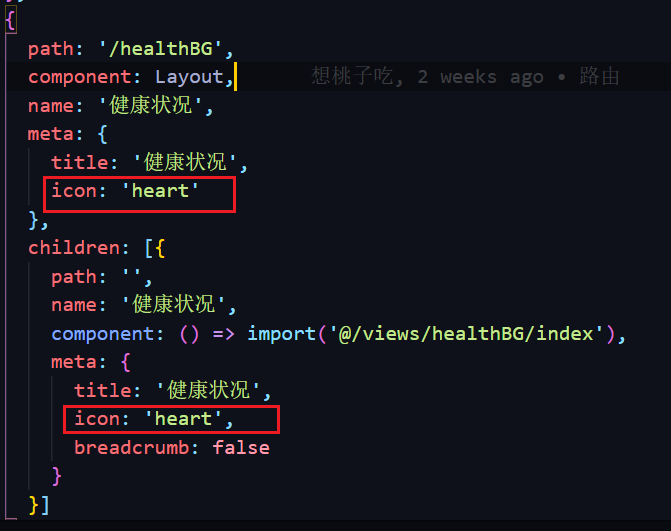
heart就是svg文件名
-
自定义svg属性
-
首先需要获取到svg
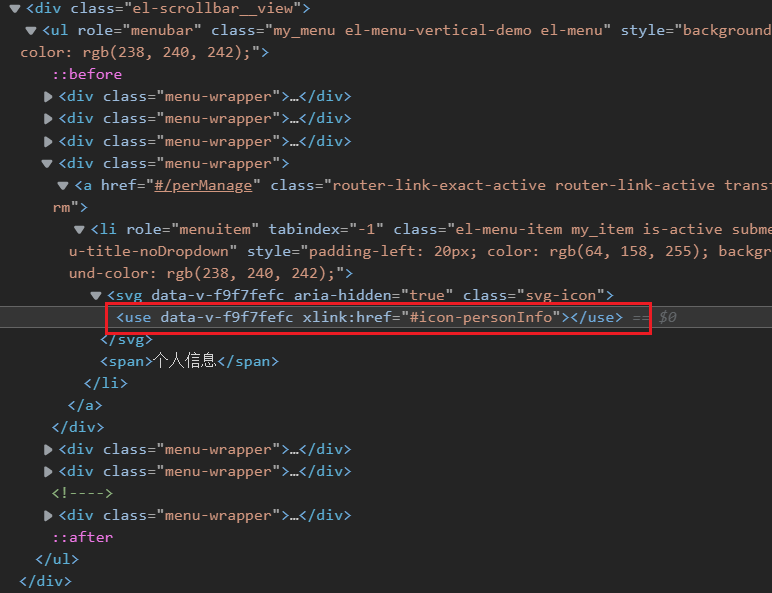
打开浏览器控制台发现图标在html中是这样的:
在vue中组件代码是这样的:
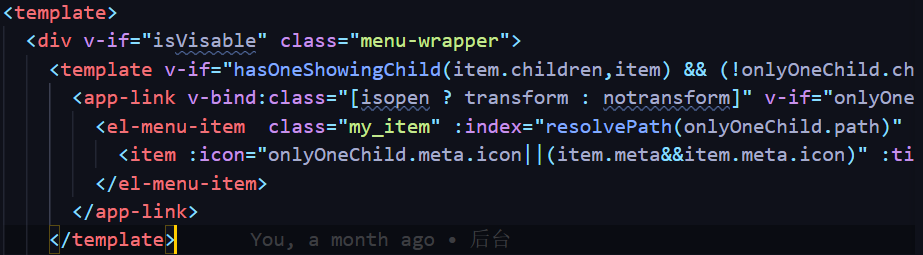
svg图标最终是被渲染到了 use 标签上, 只要我们根据class选择器选择到它即可更改它的属性, 起到自定义svg图标的效果
-
svg颜色属性
-
打开一个svg图标大致可以看到这些内容:
<svg xmlns="http://www.w3.org/2000/svg" viewBox="0 0 48 48" width="39" height="39" style="fill: rgba(255, 255, 255, 0);border-color: rgba(187,187,187,1);border-width: 0px;border-style: solid" filter="none"> <rect x="13" y="13" width="22" height="22" rx="3" fill="none" stroke="#333" stroke-width="4"></rect> <path d="M29 35V42C29 43.1046 28.1046 44 27 44H21C19.8954 44 19 43.1046 19 42V35" stroke="#333" stroke-width="4" stroke-linecap="round" stroke-linejoin="round"></path> <path d="M19 13V6C19 4.89543 19.8954 4 21 4H27C28.1046 4 29 4.89543 29 6V13" stroke="#333" stroke-width="4" stroke-linecap="round" stroke-linejoin="round"></path> <path d="M35 21H37" stroke="#333" stroke-width="4" stroke-linecap="round" stroke-linejoin="round"></path> <path d="M19 24H21" stroke="#333" stroke-width="4" stroke-linecap="round" stroke-linejoin="round"></path> <path d="M27 24H29" stroke="#333" stroke-width="4" stroke-linecap="round" stroke-linejoin="round"></path> </svg>- 一个svg图标由多个path及rect组成, 可在css中对进行设置, fill是填充颜色, stroke是阴影色, width和height是svg大小(通常需一起设置保证比例不变)
-
-
通过css设置svg颜色的案例:
use {
  fill: #1e3799;
  stroke: #1e3799;
}
svg path {
  fill: inherit;
  stroke: inherit;
}
svg rect {
  stroke: inherit;
}
#app .sidebar-container .svg-icon {
  /* padding-top: 5px; */
  width: 20px;
  height: 20px;
  /* transform: translate(5px,5px); */
}
.my_menu div:nth-child(4) svg use{
  fill: rgba(187,187,187,0);
}
.my_menu div:nth-child(5) svg use{
  fill: rgba(187,187,187,0);
}
.my_menu div:nth-child(6) svg use{
  fill: rgba(74, 105, 189, 0);
}
/* 侧边栏展开时icon图标偏移 */
.transform .svg-icon {
  transform: translate(5px,5px);
}
/* 侧边栏关闭时icon图标不偏移 */
.notransform .svg-icon {
  transform: translate();
}
-
-